USB-Stick funktioniert nicht mehr/en: Unterschied zwischen den Versionen
Uslex (Diskussion | Beiträge) Die Seite wurde neu angelegt: „== TrainController 10 ==“ |
Uslex (Diskussion | Beiträge) Die Seite wurde neu angelegt: „*Source: [https://www.freiwaldsoftware.de/forum/viewtopic.php?f=5&t=39337 Forenbeitrag] *defective USB sticks: [https://www.freiwaldsoftware.de/forum/viewtopic.php?p=269574#p269574 freiwaldsoftware.de] *TC10: TrainController without USB stick“ |
||
| (24 dazwischenliegende Versionen desselben Benutzers werden nicht angezeigt) | |||
| Zeile 5: | Zeile 5: | ||
== TrainController 10 == | == TrainController 10 == | ||
Starting with TrainController version 10, a license USB stick is no longer included. Further information can be found here: [[Special:MyLanguage/TrainController ohne USB-Stick|TrainController without USB stick]]. | |||
< | <span id="TrainController_7,8_und_9"></span> | ||
== TrainController 7,8 | == TrainController 7,8 and 9 == | ||
< | <span id="Probleme_mit_dem_USB-Stick"></span> | ||
=== | === Problems with the USB stick === | ||
The USB stick used to activate TrainController is no longer working. | |||
The PC no longer recognizes the stick; several USB ports have been tried. | |||
Is there another trick? | |||
< | <span id="USB_Stick_gegen_Raubkopien"></span> | ||
=== USB Stick | === USB Stick Against Pirated Copies === | ||
Software products from the Railroad & Co. family are protected against piracy with a USB stick. You will receive this stick after purchasing a license for one of these programs. | |||
:[[Datei:LizenzStick.png|LizenzStick.png]] | :[[Datei:LizenzStick.png|LizenzStick.png]] | ||
: | :''Fig: USB stick'' | ||
'' | |||
The FAQ linked below is intended to provide you with information about the USB stick and help you with its use. | |||
* FAQs about the USB stick can be found in the post [https://www.freiwaldsoftware.de/forum/viewtopic.php?t=9868 Notes on the Railroad&Co. USB stick] | |||
* | |||
< | <span id="Tipp:_nicht_ständig_aus-_und_einstecken"></span> | ||
=== | === Tip: Avoid constantly unplugging and plugging it back in === | ||
*Mr. Freiwald writes in this [https://www.freiwaldsoftware.de/forum/viewtopic.php?p=242002#p242002 post] in the forum: | |||
* | |||
The USB stick should not be constantly plugged in and unplugged, but should ideally remain permanently connected to the PC to which the model railway is connected. Using a short USB cable for the stick is highly recommended. | |||
Processing the data on a separate "office PC" without a connected model railway is also possible without a USB stick. | |||
< | <span id="USB-Stecker_ausgeleiert"></span> | ||
=== USB | === USB connector worn out === | ||
Due to recent events and because this is repeatedly handled poorly, I would like to point out the following: | |||
USB connectors tend to become loose if they are frequently plugged and unplugged from a USB port. This can eventually lead to contact problems. | |||
< | <span id="Austausch_von_defekten_USB-Sticks"></span> | ||
== | == Replacing defective USB sticks == | ||
< | <span id="TrainController_7,_8_und_9"></span> | ||
=== TrainController 7, 8 | === TrainController 7, 8 and 9 === | ||
The replacement program for defective USB sticks for TrainController 7, 8, and 9 ended permanently on August 2, 2024. | |||
Further information can be found at [https://www.freiwaldsoftware.de/forum/viewtopic.php?f=11&t=42020 freiwaldsoftware.de]. | |||
< | <span id="Der_Stick_wurde_beschädigt"></span> | ||
=== The USB stick was damaged === | |||
</ | |||
It's no longer working, and Windows Explorer doesn't show a drive letter for the USB stick. The same thing is happening on other computers. What now? | |||
Then the USB stick is probably no longer functional. A replacement is no longer possible. However, if you wish to continue using the software, you don't need to purchase a completely new full version. An upgrade to the current version is possible even with a defective USB stick. Please contact at [https://www.freiwaldsoftware.de/forum/viewtopic.php?p=269574#p269574 Freiwald Software]. Do not throw the USB stick away under any circumstances. It will definitely be needed for an upgrade. And please do not send the USB stick back to us unsolicited. | |||
== Weblinks == | == Weblinks == | ||
*Source: [https://www.freiwaldsoftware.de/forum/viewtopic.php?f=5&t=39337 Forenbeitrag] | |||
* | *defective USB sticks: [https://www.freiwaldsoftware.de/forum/viewtopic.php?p=269574#p269574 freiwaldsoftware.de] | ||
* | *TC10: [[Special:MyLanguage/TrainController ohne USB-Stick|TrainController without USB stick]] | ||
*TC10: [[Special:MyLanguage/TrainController ohne USB-Stick|TrainController | |||
Aktuelle Version vom 29. Dezember 2025, 16:46 Uhr
| Verwendung |

|
TrainController 10
Starting with TrainController version 10, a license USB stick is no longer included. Further information can be found here: TrainController without USB stick.
TrainController 7,8 and 9
Problems with the USB stick
The USB stick used to activate TrainController is no longer working. The PC no longer recognizes the stick; several USB ports have been tried.
Is there another trick?
USB Stick Against Pirated Copies
Software products from the Railroad & Co. family are protected against piracy with a USB stick. You will receive this stick after purchasing a license for one of these programs.
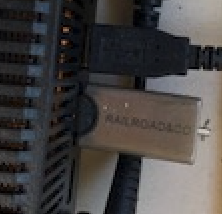
- Fig: USB stick

The FAQ linked below is intended to provide you with information about the USB stick and help you with its use.
- FAQs about the USB stick can be found in the post Notes on the Railroad&Co. USB stick
Tip: Avoid constantly unplugging and plugging it back in
- Mr. Freiwald writes in this post in the forum:
The USB stick should not be constantly plugged in and unplugged, but should ideally remain permanently connected to the PC to which the model railway is connected. Using a short USB cable for the stick is highly recommended.
Processing the data on a separate "office PC" without a connected model railway is also possible without a USB stick.
USB connector worn out
Due to recent events and because this is repeatedly handled poorly, I would like to point out the following:
USB connectors tend to become loose if they are frequently plugged and unplugged from a USB port. This can eventually lead to contact problems.
Replacing defective USB sticks
TrainController 7, 8 and 9
The replacement program for defective USB sticks for TrainController 7, 8, and 9 ended permanently on August 2, 2024.
Further information can be found at freiwaldsoftware.de.
The USB stick was damaged
It's no longer working, and Windows Explorer doesn't show a drive letter for the USB stick. The same thing is happening on other computers. What now?
Then the USB stick is probably no longer functional. A replacement is no longer possible. However, if you wish to continue using the software, you don't need to purchase a completely new full version. An upgrade to the current version is possible even with a defective USB stick. Please contact at Freiwald Software. Do not throw the USB stick away under any circumstances. It will definitely be needed for an upgrade. And please do not send the USB stick back to us unsolicited.
Weblinks
- Source: Forenbeitrag
- defective USB sticks: freiwaldsoftware.de
- TC10: TrainController without USB stick
- -- Wohlmannstetter 22:11, 25. Jan. 2010
- bearbeitet: Uslex 18:11, 20. Mär. 2022 (CET), Uslex 09:53, 10. Jan. 2023 (CET), Uslex 13:57, 16. Mai 2024 (CEST), Uslex 10:29, 2. Jun. 2025 (CEST)

