Lok- und Wagenbilder sind plötzlich weg/en: Unterschied zwischen den Versionen
Aus RailRoad&Co.-Wiki
Zur Navigation springenZur Suche springen
Uslex (Diskussion | Beiträge) Die Seite wurde neu angelegt: „=== Repairing locomotive and carriage images ===“ |
Uslex (Diskussion | Beiträge) Die Seite wurde neu angelegt: „To make all the images visible again, you can either: * move the folder and all the images back to their original location * or reassign each image individually.“ |
||
| Zeile 30: | Zeile 30: | ||
=== Repairing locomotive and carriage images === | === Repairing locomotive and carriage images === | ||
To make all the images visible again, you can either: | |||
* move the folder and all the images back to their original location | |||
* | * or reassign each image individually. | ||
* | |||
:[[Datei:LokBilderDa.PNG|400px]] | :[[Datei:LokBilderDa.PNG|400px]] | ||
Version vom 5. April 2026, 19:47 Uhr
| Verwendung |

|
Locomotive and carriage pictures missing
pictures are suddenly gone
All my locomotive and carriage pictures have suddenly disappeared. What could be the reason for this?
TrainController remembers the memory location
- Model railroader trenino gives this tip in the forum:
Each locomotive image is linked to an image file for each locomotive object.
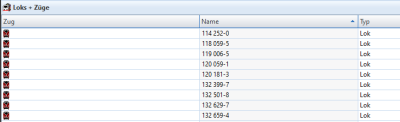
- Fig: Images missing

TrainController remembers the location (path) of this file and loads the image on startup.
- Either the path to the image files no longer matches, or
- the entire folder containing the TrainController files has been moved, or
- the folder has been deleted.
Repairing locomotive and carriage images
To make all the images visible again, you can either:
- move the folder and all the images back to their original location
- or reassign each image individually.

Abb: Lokbilder
Weblinks
- Quelle: Forum
- TC-wiki: Lokführerstand gleich gross
- TC-wiki: Dateiendungen von TC
- -- Uslex (Diskussion) 15:32, 19. Apr. 2022 (CEST)
- bearbeitet: Uslex (Diskussion) 15:53, 18. Feb. 2024 (UTC)

