Uncoupling of wagons with +Smarthand hand controller
Aus RailRoad&Co.-Wiki
| Verwendung |

|
+Smarthand hand controller
Detach the 2nd or 3rd car from the train
How do I detach the second or third car from the train? Or what if there's a freight car on each end of the locomotive and I need to uncouple a car on one end? Does anyone have any tips on how to do this with the +SmartHand controller?
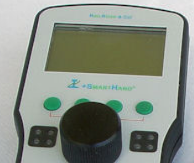
- Fig.: SmartHand controller

Uncoupling of wagons
Mr. Freiwald describes the functionality in this forum post:
For each car you want to detach, assign any special function. For clarity, only cars with special functions are offered for selection on +SmartHand controllers.
- In the +SmartHand controller, select the car and activate the toolbar by tapping the info bar. The toolbar now contains a command to separate the train consist in front of the currently selected car.
- Alternativ bzw. zusätzlich können Sie beim Wagen auch Sonderfunktionen zum Trennen links und/oder rechts vom Wagen einrichten und diese im Handregler anklicken.
Wagen variabel abkuppeln ab TrainController Version 9
Zum Thema Wagen variabel abkuppeln gibt es einen eigenen Artikel im TC-wiki: Wagen variabel abkuppeln
Weblinks
- Quelle: Forum
- TC-wiki: Wagen variabel abkuppeln
- -- Digi thomas2003 22:49, 28. Feb. 2014
- bearbeitet: Wohlmannstetter 14:14, 17. Apr. 2021 (CEST), Uslex 09:33, 8. Mai 2024 (CEST)

