Help:Create a new page
| Verwendung |

|
How do I create a new article in the TC wiki?
Step 1: Think of a name
I think of a name for the new article. In this example we choose the name:
- Cleaning wheels
Step 2: Classify articles
Next, I consider which category this new article should be placed in. In this example, it would be the category:
- Hardware
I click on the selected category Hardware in the navigation and look for the place where the new article fits in. In this example, the chapter would be:
- Locomotives in the Hardware section.
Step 3: Edit category
I'll edit the Hardware section and add the link to the new article there.
This is what it looks like before the new entry:
===Preparing locomotives for TC=== * [[Special:MyLanguage/Decoder_Bremsverzögerung|Decoder_Braking_Delay]] * [[Special:MyLanguage/Decoder Geschwindigkeitsprofil|Decoder Speed Profile]] - Setting minimum, average and maximum speed
Und so sieht es nach dem Neueintrag mit dem eingefügten Räder säubern aus:
===Preparing locomotives for TC=== * [[Special:MyLanguage/Decoder_Bremsverzögerung|Decoder_Braking_Delay]] * [[Special:MyLanguage/Decoder Geschwindigkeitsprofil|Decoder Speed Profile]] - Setting minimum, average and maximum speed * [[Special:MyLanguage/Räder säubern|Cleaning wheels]]
Step 4: Save
The link for the new article Cleaning wheels has been created, the change is saved.

- Fig: Link is red

Check: The new article should now appear red because it does not yet exist. We have only created a link to it.
Step 5: Write article content
Now comes the actual creation of the new article. To do this, I click on red link with the new article name Cleaning wheels.
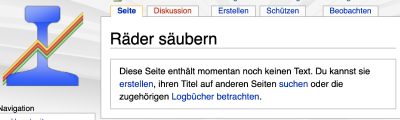
- Fig: New article

The newly created article Cleaning wheels appears, click on:
- "create" and you can start writing immediately.
New article
Basic framework for the new article
This basic structure can simply be copied and pasted into the new empty article.
{{TC78910gsb}}
__NOTOC__
== Main heading ==
=== Chapter heading ===
Contents
== Weblinks ==
*Source: [Link]
:-- ~~~~
[[Kategorie: ....]]
Erläuterungen für das Grundgerüst
Hier werden die einzelnen Zeilen des Grundgerüstes erklärt.
{{TC78910gsb}} für welche TC Version(en) gültig? 7 8 9 10 und die Farbe (g)old (s)ilver (b)ronze
__NOTOC__ kein extra Inhaltsverzeichnis erstellen
== Hauptüberschrift == hier ersetzen
=== Kapitelüberschrift === hier auch
Inhalt des Artikels einfügen
== Weblinks ==
*Quelle: [Link] Bezug zum Thema im Forum herstellen
:-- [[Benutzer:Uslex|Uslex]] ([[Benutzer Diskussion:Uslex|Diskussion]]) 13:12, 7. Jun. 2023 (CEST) die Wellen werden automatisch durch den Namen des Autors ersetzt
[[Kategorie: ....]] eventuell diese Zeile mehrfach für mehrere Kategorien
Das war es schon. Viel Spass bei der Erstellung neuer Artikel.
- --Uslex (Diskussion) 09:22, 9. Apr. 2021 (CEST)
- bearbeitet: Uslex (Diskussion) 08:53, 5. Feb. 2023 (CET), Uslex (Diskussion) 10:21, 31. Jan. 2025 (CET)

