I would like to make my attachment file available.
Aus RailRoad&Co.-Wiki
| Verwendung |

|
Provide attachment file
Exit TrainController first
Before the asset file can be made available, TrainController must be closed. An open file cannot be compressed.
Also:
- Exit TrainController and
- wait a few seconds to ensure everything is properly saved and closed.
Create ZIP file
The following procedure is necessary to provide an attachment file/project file or an image:
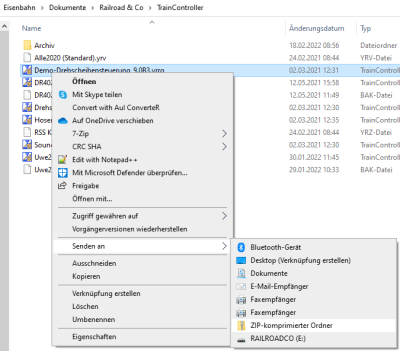
- Image: ZIP-compressed folder

- Open Windows Explorer
- Open the folder "My Documents" and then "Documents" -> "Railroad&Co" -> "TrainController"
- Select the correct file (click once - do not double-click - release the mouse button)
- Right-click and select "Send to"
- Select "Compressed (zipped) folder"
Uploading file attachments in the forum
- The file with the extension *.zip can then be uploaded.
Under "Upload file attachment" in the forum, only file extensions *.zip; *.pdf and image files can be uploaded.
Welche Datei gehört zu welchem TC Programm?
Im TC-wiki unter Dateiendungen wird beschrieben, welche Dateiendung zu welchem TC Programm gehört. Sobald die richtige Datei gefunden ist, kann mit dem Schritt "ZIP Datei erzeugen" weiter gemacht werden.
Weblinks
- Forum: www.freiwaldsoftware.de/forum
- TC-wiki: Dateiendungen von TC
- TC-wiki: Frage im Forum stellen
- -- Wohlmannstetter (Diskussion) 10:22, 30. Jan. 2010 (CET)
- bearbeitet: Digi thomas2003 14:46, 1. Feb. 2014, Uslex (Diskussion) 13:31, 19. Jul. 2022 (CEST), Uslex (Diskussion) 14:37, 19. Jul. 2023 (UTC)

