Macro Operation End Detection and Control Subsequent Processes
| Verwendung |

|
Macro in TrainController
What is a macro?
A macro is a sequence of operation instructions that can be called from different other operations and therefore only needs to be created once.
End of Macro
In TC posts, the desire was repeatedly expressed that the user would like to know when a macro finishes processing its operations, in order to then be able to start further actions.
Unlike a macro in normal programming languages:
- After a macro in TrainController finishes, the action AFTER the macro call does NOT continue from its end,
- BUT the macro ends WITHOUT "returning" to the calling point!
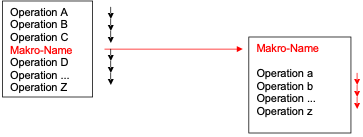
- Fig.: Macro Operation sequence

If further operations follow the macro call in TrainController, these are continued DIRECTLY after the call, i.e., they are processed "in parallel".
Recognize the end
This document describes the use of macros in the TC program in general and presents various ways in which the end of a macro - "program flow" can be recognized and how further processes (operations) in TC objects can follow from it.
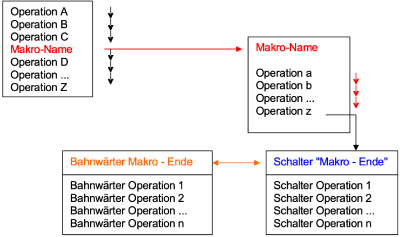
- Fig: Operation Z at macro end

No waiting time is deliberately used so that the processes flow seamlessly into one another – without the known problems associated with waiting times.
It should be noted now that the reader will not find their specific case addressed directly. They must derive the solution to their case from the "general principles" outlined.
Download document
The following document shows ways to detect a macro - running and how to create behavior that is similar to the behavior in "normal programming languages" and initiates processes in other TC objects.
The document was provided by Jens Mohr and can be accessed as a PDF under the title: "TC-Makro_Operationsende_Erkennung-WiKi.pdf".
Weblinks
- Anleitung: TC-Makro_Operationsende_Erkennung-WiKi.pdf

