Entfernungs- und Längenangaben/en: Unterschied zwischen den Versionen
Aus RailRoad&Co.-Wiki
Zur Navigation springenZur Suche springen
Uslex (Diskussion | Beiträge) Die Seite wurde neu angelegt: „I thought TrainController would know automatically when there was no more space in a block to line up more locomotives or trains.“ |
Uslex (Diskussion | Beiträge) Die Seite wurde neu angelegt: „*Source: [https://www.freiwaldsoftware.de/forum/viewtopic.php?p=271472#p271472 Forum] *TC-wiki: Terms: Block - Detector - Marker *TC-wiki: Block - Speed marking“ |
||
| (7 dazwischenliegende Versionen desselben Benutzers werden nicht angezeigt) | |||
| Zeile 12: | Zeile 12: | ||
:[[Datei:BlockAufreihen.png|BlockAufreihen.png]] | :[[Datei:BlockAufreihen.png|BlockAufreihen.png]] | ||
: | :''Fig.: Arranging in blocks'' | ||
'' | |||
Mr. Freiwald writes the following in the [https://www.freiwaldsoftware.de/forum/viewtopic.php?p=271472#p271472 forum]: | |||
< | <span id="Entfernungsangaben_sind_keine_Längenangaben"></span> | ||
=== | === Distance measurements are not length measurements === | ||
The distance indicator in the special marker only determines the location where the trains stop. It is a distance indicator, not a length indicator. | |||
< | <span id="Maximale_Zuglänge"></span> | ||
=== | === Maximum train length === | ||
The space available in the block is determined solely by setting the maximum move length in the block. | |||
== Weblinks == | == Weblinks == | ||
*Source: [https://www.freiwaldsoftware.de/forum/viewtopic.php?p=271472#p271472 Forum] | |||
* | *TC-wiki: [[Begriffe: Block - Melder - Markierung|Terms: Block - Detector - Marker]] | ||
*TC-wiki: [[Begriffe: Block - Melder - Markierung| | *TC-wiki: [[Special:MyLanguage/Block - Geschwindigkeitsmarkierung|Block - Speed marking]] | ||
*TC-wiki: [[Special:MyLanguage/Block - Geschwindigkeitsmarkierung|Block - | |||
Aktuelle Version vom 1. Januar 2026, 18:57 Uhr
| Verwendung |

|
Distance and length information
Space to line up
I thought TrainController would know automatically when there was no more space in a block to line up more locomotives or trains.
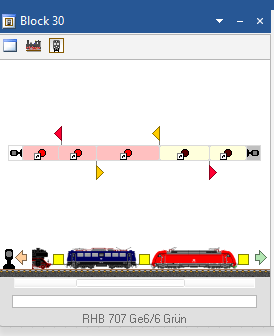
- Fig.: Arranging in blocks

Mr. Freiwald writes the following in the forum:
Distance measurements are not length measurements
The distance indicator in the special marker only determines the location where the trains stop. It is a distance indicator, not a length indicator.
Maximum train length
The space available in the block is determined solely by setting the maximum move length in the block.
Weblinks
- Source: Forum
- TC-wiki: Terms: Block - Detector - Marker
- TC-wiki: Block - Speed marking
- -- Uslex 13:38, 9. Dez. 2024 (CET)

