Rollenprüfstand/en: Unterschied zwischen den Versionen
Uslex (Diskussion | Beiträge) Die Seite wurde neu angelegt: „Roller test bench“ |
Uslex (Diskussion | Beiträge) Die Seite wurde neu angelegt: „=== Physics - Roller Test Benches ===“ |
||
| (23 dazwischenliegende Versionen von 2 Benutzern werden nicht angezeigt) | |||
| Zeile 1: | Zeile 1: | ||
<languages/> | <languages/> | ||
{{ | {{TC7891011gsb}} | ||
__NOTOC__ | __NOTOC__ | ||
< | <span id="Lok_einmessen_mit_dem_Rollenprüfstand"></span> | ||
== | == Calibrate the locomotive with the roller test bench == | ||
< | <span id="Physik_-_Rollenprüfstände"></span> | ||
=== | === Physics - Roller Test Benches === | ||
First and foremost, physics: Even with load-controlled decoders, the physical properties of the vehicles must not be ignored. | |||
On the roller test stand, the physical mass/inertia has virtually no influence on the measurement result, since the locomotive mass (i.e. the locomotive weight) does not have to be set in motion on the test stand. | |||
On the measuring track, however, it is different: Here, the inertia of the mass must be overcome during the measuring process so that the locomotive can even start moving in the first place. | |||
Therefore, it is reasonable to assume that the locomotives run faster on a roller test stand than on the rails, even if everything is identical from an electrical point of view. | |||
:[[Datei:Rollenprüfstand.jpg|400px>]] | :[[Datei:Rollenprüfstand.jpg|400px>]] | ||
: | :''Fig.: Roller test bench'' | ||
'' | |||
* Michael Mertner described the pros and cons in [[Medium:Einmessen_mit_Lichtschranke_kontra_Messtrecke.pdf|pros and cons.pdf]] in [https://www.freiwaldsoftware.de/forum/viewtopic.php?p=210554#p210554 this] post. | |||
* Michael Mertner | |||
< | <span id="TrainController_ab_Version_9"></span> | ||
== TrainController | == TrainController from version 9 == | ||
From version 9 onwards, TrainController offers a general, hardware- and manufacturer-independent interface that can be used conversely by the various measurement systems. | |||
*Mr. Freiwald writes about this in this [https://www.freiwaldsoftware.de/forum/viewtopic.php?p=192743#p192743 post]: | |||
* | |||
Since version 9, virtually any roller test bench and other measuring system that offers a PC interface can be used for calibration. A return to limiting support to just a few roller test benches, as in version 8, is certainly no longer practical. | |||
However, we no longer expend a great deal of effort for each individual system to program a special adaptation to the respective PC interface of that system. | |||
Instead, we take advantage of the fact that manufacturers of such systems already have (or are required to have) software that fully operates their own PC interface and can display measured values. Without such software, the manufacturers would not have been able to test their own PC interface before releasing it. | |||
Starting with version 9, TrainController offers an automated measurement procedure where measured speeds are copied to the Windows clipboard during the calibration process. Manufacturers of measurement systems simply need to extend their existing software to write the measured or displayed values to the clipboard. This can be done with fewer than 10 lines of code. And if you don't know how, you can find countless code examples online in all common programming languages. | |||
TrainController | |||
< | <span id="Windows_Zwischenablage"></span> | ||
=== | === Windows clipboard === | ||
Silvio Richter describes in the [https://www.freiwaldsoftware.de/forum/viewtopic.php?p=282074#p282074 forum]: | |||
What is often forgotten and/or overlooked is the fact that Windows no longer has "one" Windows clipboard, but several in parallel. | |||
Communication with TrainController runs via this clipboard. | |||
In Windows, you can configure the clipboard so that there is only one. Your favorite search engine can provide you with this information. | |||
< | <span id="µCon_Railspeed_ab_TC_9"></span> | ||
=== | === µCon Railspeed from TC 9 === | ||
µCon Railspeed definitely works with TrainController 9. You also need to download the "Railspeed Data Copy Tool for TrainController 9 Gold" (RDCT) software from LSDigital's download section [https://www.lsdigital-shop.de/download/]. This tool runs alongside TrainController and receives the data from µCon Railspeed, copying it to the Windows clipboard, from where TrainController then retrieves the data. | |||
< | <span id="Zeller_Rollenprüfstände_ab_TC_9"></span> | ||
:Windows 7 | === Zeller roller test benches from TC 9 === | ||
KPF-Zeller's roller test stands also work with TrainController 9. You also need to download the "SpeedCat PLUS" software as a ZIP file from the [https://kpf-zeller.de/shop_content.php?coID=211 download area] on the KPF-Zeller website and install it alongside TrainController. | |||
<span id="TrainController_bis_Version_8"></span> | |||
== TrainController to Version 8 == | |||
TrainController 7 and 8 support the calibration of locomotives using roller test stands. However, a few details need to be considered. | |||
<span id="RAILROAD.INI_für_TC_7_und_8"></span> | |||
=== RAILROAD.INI for TC 7 and 8 === | |||
TrainController itself does not offer any configuration options for the roller test stands. From TrainController 7.0 F3 onwards, these settings can be configured in the RAILROAD.INI file. However, depending on the Windows version used, this file is not always easy to find. | |||
:Windows 7 with active user accounts: | |||
:C:\Users\UserName\AppData\Local\VirtualStore\Program Files (x86)\Railroad & Co.80 | :C:\Users\UserName\AppData\Local\VirtualStore\Program Files (x86)\Railroad & Co.80 | ||
:Windows 7 without user accounts, older Windows versions: | |||
:Windows 7 | |||
:C:\Program Files (x86)\Railroad & Co.80 | :C:\Program Files (x86)\Railroad & Co.80 | ||
A corresponding entry must be added to the ''[Connections]'' section. | |||
< | <span id="Zeller_Rollenprüfstände_und_TC_8"></span> | ||
=== Zeller | === Zeller roller test benches and TC 8 === | ||
The test benches from the company "Marion Zeller" offer an option for different scales. The following entry can be found in the online program help: | |||
'''ZellerDiameter''' | '''ZellerDiameter''' | ||
Set this value to xxx, where xxx represents the diameter of the roller in hundredths of a millimeter. The default setting is '''ZellerDiameter=593''', which is suitable for a roller diameter of 5.93 mm. | |||
The following values show examples for the various test benches of Marion Zeller GmbH: | |||
:610: 6,10 mm for gauge H0, 0 and 1 | |||
:610: 6,10 mm | :475: 4,75 mm for gauge N | ||
:475: 4,75 mm | :580: 5,80 mm for gauge TT | ||
:580: 5,80 mm | |||
Example: | |||
[Connections] | [Connections] | ||
ZellerDiameter=475 | ZellerDiameter=475 | ||
KPF-Zeller has released a new rotary encoder for its Speed-Cat system. This precision encoder offers four times the resolution of the standard Speed-Cat encoder and is designed to enable more precise measurements at lower speeds. Therefore, the default value (593) is no longer valid and must be divided by 4. | |||
Example: | |||
[Connections] | [Connections] | ||
ZellerDiameter=148 | ZellerDiameter=148 | ||
== Weblinks == | == Weblinks == | ||
*Sourcee: [https://www.freiwaldsoftware.de/forum/viewtopic.php?p=192743#p192743 forum] | |||
* | *Pro and contra: [[Medium:Einmessen_mit_Lichtschranke_kontra_Messtrecke.pdf|Measuring with light barrier versus measuring section.pdf]] | ||
*Pro | *µCon Railspeed: [https://www.lsdigital-shop.de/download/ download] | ||
*µCon Railspeed: [https://www.lsdigital-shop.de/download/ | *Zeller roler bench: [https://kpf-zeller.de/shop_content.php?coID=211 download] | ||
*Zeller | *Windows clipboard: [https://www.freiwaldsoftware.de/forum/viewtopic.php?p=282074#p282074 forum] | ||
:--[[Special:MyLanguage/Benutzer:Digi thomas2003|Digi thomas2003]] | :--[[Special:MyLanguage/Benutzer:Digi thomas2003|Digi thomas2003]] 16:36, 6. Jan. 2015 (CET) | ||
: | :bearbeitet: [[Special:MyLanguage/Benutzer:Wohlmannstetter|Wohlmannstetter]] 18:13, 7. Mär. 2021 (CET), [[Benutzer:Uslex|Uslex]] 13:41, 19. Dez. 2025 (UTC) | ||
Aktuelle Version vom 27. Juli 2026, 14:58 Uhr
| Verwendung |

|
Calibrate the locomotive with the roller test bench
Physics - Roller Test Benches
First and foremost, physics: Even with load-controlled decoders, the physical properties of the vehicles must not be ignored.
On the roller test stand, the physical mass/inertia has virtually no influence on the measurement result, since the locomotive mass (i.e. the locomotive weight) does not have to be set in motion on the test stand.
On the measuring track, however, it is different: Here, the inertia of the mass must be overcome during the measuring process so that the locomotive can even start moving in the first place.
Therefore, it is reasonable to assume that the locomotives run faster on a roller test stand than on the rails, even if everything is identical from an electrical point of view.
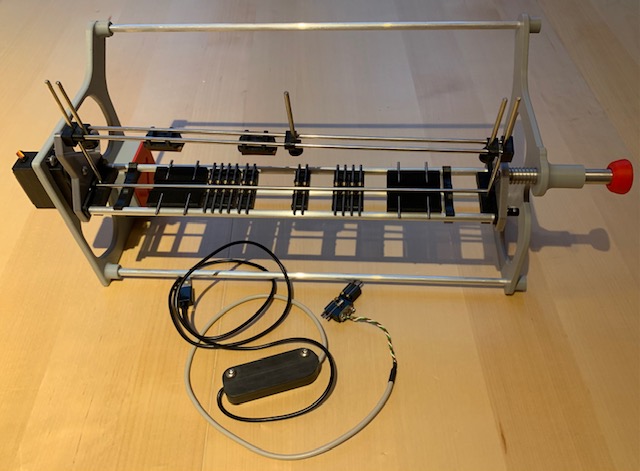
- Fig.: Roller test bench

- Michael Mertner described the pros and cons in pros and cons.pdf in this post.
TrainController from version 9
From version 9 onwards, TrainController offers a general, hardware- and manufacturer-independent interface that can be used conversely by the various measurement systems.
- Mr. Freiwald writes about this in this post:
Since version 9, virtually any roller test bench and other measuring system that offers a PC interface can be used for calibration. A return to limiting support to just a few roller test benches, as in version 8, is certainly no longer practical.
However, we no longer expend a great deal of effort for each individual system to program a special adaptation to the respective PC interface of that system.
Instead, we take advantage of the fact that manufacturers of such systems already have (or are required to have) software that fully operates their own PC interface and can display measured values. Without such software, the manufacturers would not have been able to test their own PC interface before releasing it.
Starting with version 9, TrainController offers an automated measurement procedure where measured speeds are copied to the Windows clipboard during the calibration process. Manufacturers of measurement systems simply need to extend their existing software to write the measured or displayed values to the clipboard. This can be done with fewer than 10 lines of code. And if you don't know how, you can find countless code examples online in all common programming languages.
Windows clipboard
Silvio Richter describes in the forum:
What is often forgotten and/or overlooked is the fact that Windows no longer has "one" Windows clipboard, but several in parallel.
Communication with TrainController runs via this clipboard.
In Windows, you can configure the clipboard so that there is only one. Your favorite search engine can provide you with this information.
µCon Railspeed from TC 9
µCon Railspeed definitely works with TrainController 9. You also need to download the "Railspeed Data Copy Tool for TrainController 9 Gold" (RDCT) software from LSDigital's download section [1]. This tool runs alongside TrainController and receives the data from µCon Railspeed, copying it to the Windows clipboard, from where TrainController then retrieves the data.
Zeller roller test benches from TC 9
KPF-Zeller's roller test stands also work with TrainController 9. You also need to download the "SpeedCat PLUS" software as a ZIP file from the download area on the KPF-Zeller website and install it alongside TrainController.
TrainController to Version 8
TrainController 7 and 8 support the calibration of locomotives using roller test stands. However, a few details need to be considered.
RAILROAD.INI for TC 7 and 8
TrainController itself does not offer any configuration options for the roller test stands. From TrainController 7.0 F3 onwards, these settings can be configured in the RAILROAD.INI file. However, depending on the Windows version used, this file is not always easy to find.
- Windows 7 with active user accounts:
- C:\Users\UserName\AppData\Local\VirtualStore\Program Files (x86)\Railroad & Co.80
- Windows 7 without user accounts, older Windows versions:
- C:\Program Files (x86)\Railroad & Co.80
A corresponding entry must be added to the [Connections] section.
Zeller roller test benches and TC 8
The test benches from the company "Marion Zeller" offer an option for different scales. The following entry can be found in the online program help:
ZellerDiameter
Set this value to xxx, where xxx represents the diameter of the roller in hundredths of a millimeter. The default setting is ZellerDiameter=593, which is suitable for a roller diameter of 5.93 mm.
The following values show examples for the various test benches of Marion Zeller GmbH:
- 610: 6,10 mm for gauge H0, 0 and 1
- 475: 4,75 mm for gauge N
- 580: 5,80 mm for gauge TT
Example:
[Connections]
ZellerDiameter=475
KPF-Zeller has released a new rotary encoder for its Speed-Cat system. This precision encoder offers four times the resolution of the standard Speed-Cat encoder and is designed to enable more precise measurements at lower speeds. Therefore, the default value (593) is no longer valid and must be divided by 4.
Example:
[Connections]
ZellerDiameter=148
Weblinks
- Sourcee: forum
- Pro and contra: Measuring with light barrier versus measuring section.pdf
- µCon Railspeed: download
- Zeller roler bench: download
- Windows clipboard: forum
- --Digi thomas2003 16:36, 6. Jan. 2015 (CET)
- bearbeitet: Wohlmannstetter 18:13, 7. Mär. 2021 (CET), Uslex 13:41, 19. Dez. 2025 (UTC)