Externes Stellpult mit TC/en: Unterschied zwischen den Versionen
Übernehme Bearbeitung einer neuen Version der Quellseite |
Uslex (Diskussion | Beiträge) Die Seite wurde neu angelegt: „*Instruction: External Control Panel width_TC.pdf *TC-wiki: Start train journey with switch route via track diagram interlocking“ |
||
| (10 dazwischenliegende Versionen desselben Benutzers werden nicht angezeigt) | |||
| Zeile 6: | Zeile 6: | ||
== External control panel with TrainController == | == External control panel with TrainController == | ||
< | <span id="Stellpult_mit_Tastern"></span> | ||
=== | === Control panel with buttons === | ||
How can I connect an external control panel with buttons and switches to TrainController? | |||
:[[Datei:Stellpult extern.png|Datei:Stellpult extern.png]] | :[[Datei:Stellpult extern.png|Datei:Stellpult extern.png]] | ||
: | :''Fig.: Control panel'' | ||
'' | |||
< | <span id="Hardware-Stellpult"></span> | ||
=== Hardware | === Hardware Control Panel === | ||
I built an external control panel, meaning a control panel with "real" buttons and LEDs. The hardware control panel has no logic of its own. Instead, the button positions are read via TrainController, processed in TC, the corresponding functions are executed, and finally the indicator LEDs are controlled. | |||
Johannes Buerglin has provided instructions as a PDF: [[Medium:Externes_Stellpult_mit_TC.pdf|External control panel with_TC.pdf]] | |||
< | <span id="Tasteneinlesemodule"></span> | ||
=== | === Keypad Reader Modules === | ||
I use button (or switch) reading modules to read the button presses (or switches). These modules send the button information to the feedback bus (in the case of Sx = data bus). | |||
My modules (Sx, Stärz company, TEM 2 or TEM 2Z [button input modules]) have, among other things, two operating modes: | |||
*In the first case, the data bit is activated as long as the button is pressed, then it is deactivated again. | |||
* | *In the second mode, the data bit is toggled with each button press. I used this mode, for example, with turnouts when only one button is used – the one that switches the turnout position. | ||
* | |||
== Weblinks == | == Weblinks == | ||
*Instruction: [[Medium:Externes_Stellpult_mit_TC.pdf|External Control Panel width_TC.pdf]] | |||
* | *TC-wiki: [[Special:MyLanguage/Zugfahrt starten mit Weichenstraße via Gleisbildstellwerk|Start train journey with switch route via track diagram interlocking]] | ||
*TC-wiki: [[Special:MyLanguage/Zugfahrt starten mit Weichenstraße via Gleisbildstellwerk| | |||
Aktuelle Version vom 29. März 2026, 08:01 Uhr
| Verwendung |

|
External control panel with TrainController
Control panel with buttons
How can I connect an external control panel with buttons and switches to TrainController?
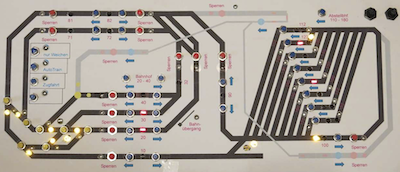
- Fig.: Control panel

Hardware Control Panel
I built an external control panel, meaning a control panel with "real" buttons and LEDs. The hardware control panel has no logic of its own. Instead, the button positions are read via TrainController, processed in TC, the corresponding functions are executed, and finally the indicator LEDs are controlled.
Johannes Buerglin has provided instructions as a PDF: External control panel with_TC.pdf
Keypad Reader Modules
I use button (or switch) reading modules to read the button presses (or switches). These modules send the button information to the feedback bus (in the case of Sx = data bus).
My modules (Sx, Stärz company, TEM 2 or TEM 2Z [button input modules]) have, among other things, two operating modes:
- In the first case, the data bit is activated as long as the button is pressed, then it is deactivated again.
- In the second mode, the data bit is toggled with each button press. I used this mode, for example, with turnouts when only one button is used – the one that switches the turnout position.
Weblinks
- Instruction: External Control Panel width_TC.pdf
- TC-wiki: Start train journey with switch route via track diagram interlocking
- -- Uslex (Diskussion) 15:00, 18. Apr. 2021
- bearbeitet: Uslex (Diskussion) 11:42, 16. Jul. 2022 (CEST), Uslex (Diskussion) 14:18, 6. Dez. 2025 (UTC)

