Einstellung der richtigen Signalbilder/en: Unterschied zwischen den Versionen
Uslex (Diskussion | Beiträge) Die Seite wurde neu angelegt: „The first image shows the default setting - for the signal aspect "green", two switching commands are sent (namely "address 1 green" and then "address 2 green") - and the signal decoder then implements this - how should it know that this is not desired?“ |
Uslex (Diskussion | Beiträge) Die Seite wurde neu angelegt: „*Signals: [https://www.gotthardmodell.ch/digitales/software/traincontroller/tipps-und-tricks/signale-ansteuern/ www.gotthardmodell.ch]“ |
||
| (4 dazwischenliegende Versionen desselben Benutzers werden nicht angezeigt) | |||
| Zeile 26: | Zeile 26: | ||
:[[Datei:SignalVierbegriffig 2.png|400px]] | :[[Datei:SignalVierbegriffig 2.png|400px]] | ||
: | :''Fig.: Four-aspect signal'' | ||
'' | |||
In the second image, only one switching command is sent per signal aspect - and lo and behold, the signal decoder and ultimately the signal also display the correct signal aspect. | |||
'''Note''': Depending on the digital system, the contacts are displayed as «red/green» or with «plus/minus» signs. | |||
''' | |||
== Weblinks == | == Weblinks == | ||
*Signals: [https://www.gotthardmodell.ch/digitales/software/traincontroller/tipps-und-tricks/signale-ansteuern/ www.gotthardmodell.ch] | |||
* | |||
Aktuelle Version vom 21. Dezember 2025, 18:46 Uhr
| Verwendung |

|
Signal images in TC
Signal images in the software
A very common question is: How do I set the correct signal images in the software?
Users of TrainController often report that the signals cannot be controlled correctly or that the desired signal aspect is only displayed correctly "very briefly".
Only one control command
This is mostly due to the fact that a signal decoder only needs one control command per signal aspect - and TrainController, when using the default settings, always sends two; first the "correct" one and then an "incorrect" one, which ultimately results in an incorrect signal aspect.
Giorgio has provided an illustrated explanation on www.gotthardmodell.ch.
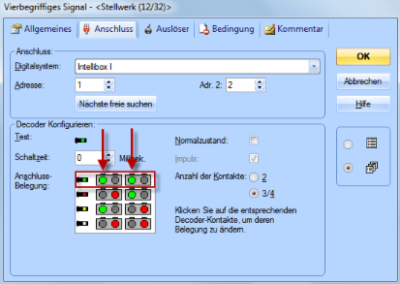
- Fig: not like this - four-aspect signal

The first image shows the default setting - for the signal aspect "green", two switching commands are sent (namely "address 1 green" and then "address 2 green") - and the signal decoder then implements this - how should it know that this is not desired?
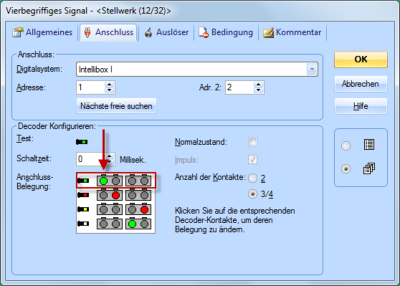
- Fig.: Four-aspect signal

In the second image, only one switching command is sent per signal aspect - and lo and behold, the signal decoder and ultimately the signal also display the correct signal aspect.
Note: Depending on the digital system, the contacts are displayed as «red/green» or with «plus/minus» signs.
Weblinks
- Signals: www.gotthardmodell.ch
- -- Wohlmannstetter 08:53, 27. Sep. 2017
- bearbeitet: Uslex 17:24, 16. Feb. 2022 (CET), Uslex (Diskussion) 16:43, 21. Dez. 2025 (UTC)

