Block in der Diagonale/en: Unterschied zwischen den Versionen
Uslex (Diskussion | Beiträge) Die Seite wurde neu angelegt: „''Fig: available in TC Gold''“ |
Uslex (Diskussion | Beiträge) KKeine Bearbeitungszusammenfassung |
||
| (4 dazwischenliegende Versionen desselben Benutzers werden nicht angezeigt) | |||
| Zeile 19: | Zeile 19: | ||
:[[Datei:PlatzverbrauchdiagonalerBlock.png|PlatzverbrauchdiagonalerBlock]] | :[[Datei:PlatzverbrauchdiagonalerBlock.png|PlatzverbrauchdiagonalerBlock]] | ||
: | :''Fig: that's not how it works'' | ||
The grayed-out cells in the vicinity would no longer be usable for other symbols. The diagonal block uses twice as many cells as its horizontal or vertical counterpart. | The grayed-out cells in the vicinity would no longer be usable for other symbols. The diagonal block uses twice as many cells as its horizontal or vertical counterpart. | ||
| Zeile 31: | Zeile 31: | ||
''Fig: available in TC Gold'' | ''Fig: available in TC Gold'' | ||
< | <span id="Zitat_aus_der_Programmbeschreibung"></span> | ||
=== | === Quote from the program description === | ||
For specific purposes, it is possible to place block symbols on diagonal track elements in TrainController Gold. For technical reasons, the size of such blocks is automatically limited to a single signal box cell. Subsequent track elements connecting these mini-blocks to adjacent blocks must connect correctly to opposite corners of the mini-blocks; otherwise, the block plan cannot be calculated correctly. | |||
== Weblinks == | == Weblinks == | ||
*Source: [https://www.freiwaldsoftware.de/forum/viewtopic.php?f=5&t=27807&p=175984&hilit=Diagonale#p175984 forum] | |||
* | *TC-wiki: [[Begriffe: Block - Melder - Markierung|Terms: Block - Detector - Marker]] | ||
*TC-wiki: [[Begriffe: Block - Melder - Markierung| | |||
Aktuelle Version vom 22. Dezember 2025, 11:59 Uhr
| Verwendung |

|
Diagonal Blocks
Question
Is it possible to equip diagonally running paths with blocks that also run diagonally?
Too much space taken up
This forum post discusses diagonal blocks.
The question of whether diagonal blocks can be created comes up very frequently in the forum. Diagonal blocks that extend across more than one signal box cell are not possible for specific reasons.
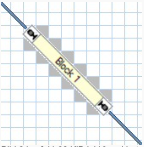
- Fig: that's not how it works

The grayed-out cells in the vicinity would no longer be usable for other symbols. The diagonal block uses twice as many cells as its horizontal or vertical counterpart.
TrainController Gold
In TrainController Gold, small blocks that only occupy a signal box cell can be placed on diagonal track symbols.

Fig: available in TC Gold
Quote from the program description
For specific purposes, it is possible to place block symbols on diagonal track elements in TrainController Gold. For technical reasons, the size of such blocks is automatically limited to a single signal box cell. Subsequent track elements connecting these mini-blocks to adjacent blocks must connect correctly to opposite corners of the mini-blocks; otherwise, the block plan cannot be calculated correctly.
Weblinks
- Source: forum
- TC-wiki: Terms: Block - Detector - Marker
- -- Wohlmannstetter 13:38, 16. Feb. 2009
- bearbeitet: Uslex 09:12, 9. Feb. 2022 (CET), Uslex 06:32, 8. Apr. 2024 (UTC)

