Verbindung zum Digitalsystem wird getrennt/en: Unterschied zwischen den Versionen
Aus RailRoad&Co.-Wiki
Zur Navigation springenZur Suche springen
Uslex (Diskussion | Beiträge) Die Seite wurde neu angelegt: „*Here you must select the power plan you are using. :*In the next window, you can change the power settings for various areas, including USB settings. :*Here you should disable selective USB power saving.“ |
Übernehme Bearbeitung einer neuen Version der Quellseite |
||
| (3 dazwischenliegende Versionen von einem anderen Benutzer werden nicht angezeigt) | |||
| Zeile 46: | Zeile 46: | ||
:*Here you should disable selective USB power saving. | :*Here you should disable selective USB power saving. | ||
Then click OK or Apply and the problem should be resolved. | |||
== Weblinks == | == Weblinks == | ||
*Source: [https://www.freiwaldsoftware.de/forum/viewtopic.php?p=146745#p146745 Forum post] | |||
* | |||
*TC-wiki: [[Special:MyLanguage/USB COM in Windows 11|USB COM in Windows 11]] | *TC-wiki: [[Special:MyLanguage/USB COM in Windows 11|USB COM in Windows 11]] | ||
*Beitrag: Probleme mit dem [[Special:MyLanguage/USB_Hub|USB_Hub]] | *Beitrag: Probleme mit dem [[Special:MyLanguage/USB_Hub|USB_Hub]] | ||
:--[[Special:MyLanguage/Benutzer:Wohlmannstetter|Wohlmannstetter]] | |||
:redaktionelle Bearbeitung: [[Special:MyLanguage/Benutzer:Wohlmannstetter|Wohlmannstetter]] | :--[[Special:MyLanguage/Benutzer:Wohlmannstetter|Wohlmannstetter]] 17:45, 30. Nov. 2014 (CET) | ||
:redaktionelle Bearbeitung: [[Special:MyLanguage/Benutzer:Wohlmannstetter|Wohlmannstetter]] 10:20, 5. Mär. 2021 (CET), [[Special:MyLanguage/Benutzer:Uslex|Uslex]] 11:47, 1. Apr. 2022 (CEST), [[Benutzer:Uslex|Uslex]] 07:24, 29. Mär. 2026 (CEST) | |||
Aktuelle Version vom 29. März 2026, 07:25 Uhr
| Verwendung |

|
Connection to the digital system is disconnected
Connection is disconnected
There are frequent complaints about a connection interruption between the computer and the digital system.
When I start my model railway and the PC, the TrainController connection to the layout works. However, if I leave the layout inactive for an extended period, the PC loses the connection. What could be the cause of this?
Solution in Windows 10 and 11
The connection is also interrupted in Windows 10 and 11, both to the digital system and in connection with the license USB stick.
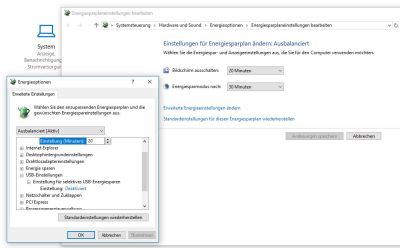
- Fig.: Energy saving plan

In Windows 10 and 11, the correct setting can be found in the power plan.
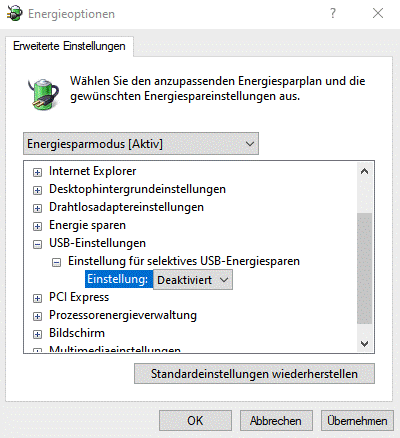
- Fig.: USB energy saving

Solution in Windows 7 and 8
For users of Win7 and Win8, the Windows power option is often the cause.
Gerald Bock described a solution in : this post
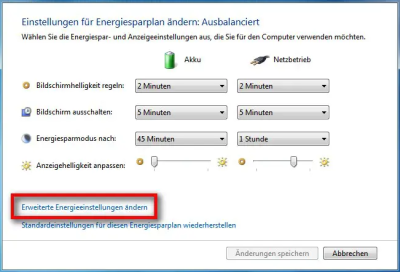
- Fig.: Energy saving plan Win7

- Select Power Options in the Control Panel.
- You will usually see that the recommended power plan, "Balanced," is enabled.
- Click the "Change plan settings" link.
- When this window opens, there is another link, "Change advanced power settings."
- Opening this link will display a window with a drop-down menu for selecting the power saving mode.
- Here you must select the power plan you are using.
- In the next window, you can change the power settings for various areas, including USB settings.
- Here you should disable selective USB power saving.
Then click OK or Apply and the problem should be resolved.
Weblinks
- Source: Forum post
- TC-wiki: USB COM in Windows 11
- Beitrag: Probleme mit dem USB_Hub
- --Wohlmannstetter 17:45, 30. Nov. 2014 (CET)
- redaktionelle Bearbeitung: Wohlmannstetter 10:20, 5. Mär. 2021 (CET), Uslex 11:47, 1. Apr. 2022 (CEST), Uslex 07:24, 29. Mär. 2026 (CEST)

