Makro Operationsende Erkennung und Folgeabläufe steuern/en: Unterschied zwischen den Versionen
Uslex (Diskussion | Beiträge) Die Seite wurde neu angelegt: „''Fig: Operation Z at macro end''“ |
Uslex (Diskussion | Beiträge) Die Seite wurde neu angelegt: „No waiting time is deliberately used so that the processes flow seamlessly into one another – without the known problems associated with waiting times.“ |
||
| Zeile 33: | Zeile 33: | ||
:''Fig: Operation Z at macro end'' | :''Fig: Operation Z at macro end'' | ||
No waiting time is deliberately used so that the processes flow seamlessly into one another – without the known problems associated with waiting times. | |||
<div lang="de" dir="ltr" class="mw-content-ltr"> | <div lang="de" dir="ltr" class="mw-content-ltr"> | ||
Version vom 28. Dezember 2025, 12:23 Uhr
| Verwendung |

|
Macro in TrainController
What is a macro?
A macro is a sequence of operation instructions that can be called from different other operations and therefore only needs to be created once.
End of Macro
In TC posts, the desire was repeatedly expressed that the user would like to know when a macro finishes processing its operations, in order to then be able to start further actions.
Unlike a macro in normal programming languages:
- After a macro in TrainController finishes, the action AFTER the macro call does NOT continue from its end,
- BUT the macro ends WITHOUT "returning" to the calling point!
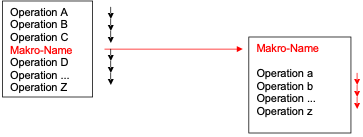
- Fig.: Macro Operation sequence

If further operations follow the macro call in TrainController, these are continued DIRECTLY after the call, i.e., they are processed "in parallel".
Recognize the end
This document describes the use of macros in the TC program in general and presents various ways in which the end of a macro - "program flow" can be recognized and how further processes (operations) in TC objects can follow from it.
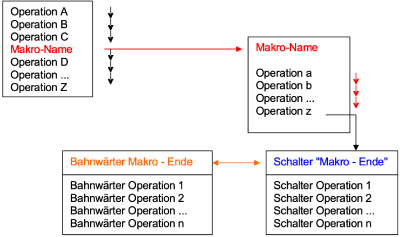
- Fig: Operation Z at macro end

No waiting time is deliberately used so that the processes flow seamlessly into one another – without the known problems associated with waiting times.
Es sei jetzt schon darauf hingewiesen, daß der Leser nicht seinen spezifischen Fall behandelt sieht. Er muß sich aus dem "Grundsätzlichen“ die Lösung zu seinem Fall ableiten.
Dokument herunterladen
Das folgende Dokument zeigt Möglichkeiten auf, wie sich ein Makro - Ablaufende erkennen läßt und wie man ein Verhalten erstellen kann, was an das Verhalten in "normalen Programmiersprachen" anknüpft sowie Abläufe in anderen TC Objekten initiert.
Das Dokument wurde von Jens Mohr zur Verfügung gestellt und kann unter dem Titel als PDF: "TC-Makro_Operationsende_Erkennung-WiKi.pdf" aufgerufen werden.
Weblinks
- Anleitung: TC-Makro_Operationsende_Erkennung-WiKi.pdf

