Druckauftrag in einem größeren Format/en: Unterschied zwischen den Versionen
Aus RailRoad&Co.-Wiki
Zur Navigation springenZur Suche springen
Uslex (Diskussion | Beiträge) Die Seite wurde neu angelegt: „== Weblinks ==“ |
Uslex (Diskussion | Beiträge) Die Seite wurde neu angelegt: „*Source: [https://www.freiwaldsoftware.de/forum/viewtopic.php?p=181800#p181800 Forum] *TC_printing.pdf“ |
||
| Zeile 30: | Zeile 30: | ||
== Weblinks == | == Weblinks == | ||
*Source: [https://www.freiwaldsoftware.de/forum/viewtopic.php?p=181800#p181800 Forum] | |||
* | *[[Medium:TC_Druckanleitung.pdf|TC_printing.pdf]] | ||
*[[Medium:TC_Druckanleitung.pdf| | |||
Aktuelle Version vom 16. Dezember 2025, 14:10 Uhr
| Verwendung |

|
Expression too small
I wanted to print out the track plan with the signals and blocks. A printout came through, but the block designations were unreadable. Everything is completely blurry.
Multi-sided print as a poster
The following window may look different depending on your printer. However, most printers have an option that is either called Multipage (as in my case), tiled page, or Poster. Here you can determine the print size by selecting the number of pages.
My fellow model railroader Klaus Mosbach (Tibor98) has presented a solution using multi-page printing (posters) and, at my request, has provided instructions TC_printing.pdf.
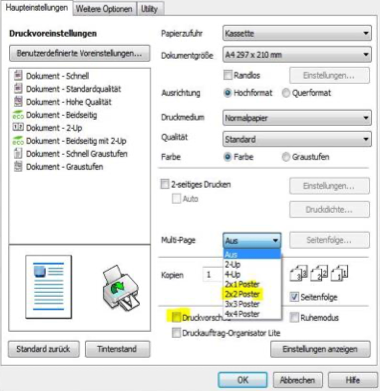
- Fig: Print 2x2 poster

- 2x1 corresponds to DIN A3
- 2x2 corresponds to DIN A2, etc.
After printing, glue the pages together and you have a readable printout of your signal box.
Weblinks
- Source: Forum
- TC_printing.pdf
- -- Wohlmannstetter 08:49, 12. Mai 2017
- redaktionelle Bearbeitung: Uslex 17:37, 22. Apr. 2022 (CEST), Uslex (Diskussion) 12:07, 16. Dez. 2025 (UTC)

