Overtaking a train
Aus RailRoad&Co.-Wiki
| Verwendung |

|
Operating point Alternate point
Overtaking a train using a station
I have set up an operating point where a "higher-value train", e.g. a passenger train, is supposed to overtake a freight train, "lower-value train", in a passing loop.
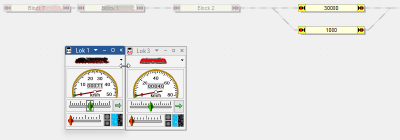
- Fig.: Operating point passing loop

Check if he should swerve
Mr. Freiwald provides the following information in the forum:
Make Block 2 the:
- Approach block (green) of the passing loop. In this block, the arriving train is checked to determine whether it should pass or not.
Make blocks 1, 2, and 7:
- Control block (monitoring block). The purpose here (presumably) is to check whether the train located within it has a higher priority.
Wartezeit nicht zu kurz wählen
Achtung: Wenn Sie die maximale Wartezeit nur auf 5 Sekunden eingestellt haben, fährt der langsame ausweichende Zug ziemlich schnell wieder weiter. Der nachfolgende schnelle Zug wird kaum Zeit haben, die Strecke weit genug zu reservieren, um den langsamen Zug daran zu hindern.
Also:
- Der letzte Block vor der Weiche zum Ausweichgleis sollte grün sein.
- Alle Blöcke vor der Weiche, in denen schnellere Züge beachtet werden sollen, sollten gelb sein.
Weblinks
- Quelle: Forum
- TC-wiki: Schneller Aufrücken
- -- Uslex (Diskussion) 08:58, 23. Dez. 2025 (UTC)

