Connection to the digital system is disconnected
Aus RailRoad&Co.-Wiki
| Verwendung |

|
Connection to the digital system is disconnected
Connection is disconnected
There are frequent complaints about a connection interruption between the computer and the digital system.
When I start my model railway and the PC, the TrainController connection to the layout works. However, if I leave the layout inactive for an extended period, the PC loses the connection. What could be the cause of this?
Solution in Windows 10 and 11
The connection is also interrupted in Windows 10 and 11, both to the digital system and in connection with the license USB stick.
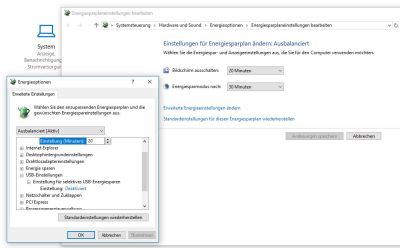
- Fig.: Energy saving plan

In Windows 10 and 11, the correct setting can be found in the power plan.
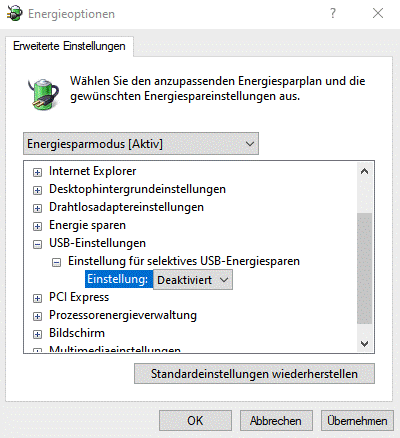
- Fig.: USB energy saving

Solution in Windows 7 and 8
For users of Win7 and Win8, the Windows power option is often the cause.
Gerald Bock described a solution in : this post
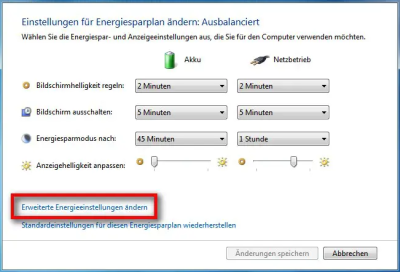
- Fig.: Energy saving plan Win7

- Select Power Options in the Control Panel.
- You will usually see that the recommended power plan, "Balanced," is enabled.
- Click the "Change plan settings" link.
- When this window opens, there is another link, "Change advanced power settings."
- Opening this link will display a window with a drop-down menu for selecting the power saving mode.
- Hier muss der verwendete Energiesparplan ausgewählt werden.
- Im nächsten Fenster kann man die Energieversorgung von verschiedenen Bereichen ändern, unter Anderen auch die der USB-Einstellungen.
- Hier sollte man das selektive USB-Energiesparen deaktivieren.
Anschließend auf OK oder übernehmen klicken und das Problem sollte behoben sein.
Weblinks
- Quelle: Forenbeitrag
- TC-wiki: USB COM in Windows 11
- Beitrag: Probleme mit dem USB_Hub
- --Wohlmannstetter (Diskussion) 17:45, 30. Nov. 2014 (CET)
- redaktionelle Bearbeitung: Wohlmannstetter (Diskussion) 10:20, 5. Mär. 2021 (CET), Uslex (Diskussion) 11:47, 1. Apr. 2022 (CEST), Uslex (Diskussion) 09:08, 31. Dez. 2024 (CET)

