External control panel with TC
| Verwendung |

|
External control panel with TrainController
Control panel with buttons
How can I connect an external control panel with buttons and switches to TrainController?
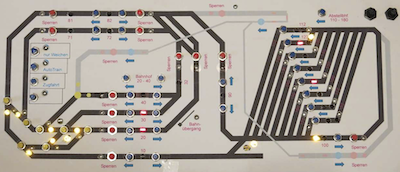
- Fig.: Control panel

Hardware Control Panel
I built an external control panel, meaning a control panel with "real" buttons and LEDs. The hardware control panel has no logic of its own. Instead, the button positions are read via TrainController, processed in TC, the corresponding functions are executed, and finally the indicator LEDs are controlled.
Johannes Buerglin has provided instructions as a PDF: External control panel with_TC.pdf
Keypad Reader Modules
I use button (or switch) reading modules to read the button presses (or switches). These modules send the button information to the feedback bus (in the case of Sx = data bus).
Meine Module (Sx, Firma Stärz, TEM 2 bzw. TEM 2Z [Tasteneinlesemodule]) haben u.a. zwei Betriebsarten:
- Im ersten Fall ist das Datenbit eingeschaltet solange der Taster gedrückt wird, danach wird es wieder ausgeschaltet.
- Im zweiten Modus wird das Datenbit mit jedem Tasterdruck umgeschaltet. Diesen Modus habe ich z.B. bei den Weichen verwendet, wenn nur ein Taster benutzt wird – mit dem eben die Weichenstellung umgeschaltet wird.
Weblinks
- -- Uslex (Diskussion) 15:00, 18. Apr. 2021
- bearbeitet: Uslex (Diskussion) 11:42, 16. Jul. 2022 (CEST), Uslex (Diskussion) 14:18, 6. Dez. 2025 (UTC)

