Fullscreen mode, how can I prevent the sliders from appearing?
| Verwendung |

|
Fullscreen mode
Scrollbar
The horizontal and vertical scroll bars (sliders) are always displayed on the screen.
Is it possible to set a true full screen (without scroll bars) for TrainController?
Edit mode
Mr. Freiwald wrote the following explanation:
In edit mode, approximately 5 empty rows and columns are always added, as otherwise, under certain circumstances, it would be impossible to add symbols to the right or bottom. However, a scroll bar does not interfere with editing mode.
Turning off edit mode
When editing mode is deactivated, the scroll area of the window is always adjusted precisely to the required size of the control panel, so that you can just barely reach the rightmost and the bottommost symbol - but no more.
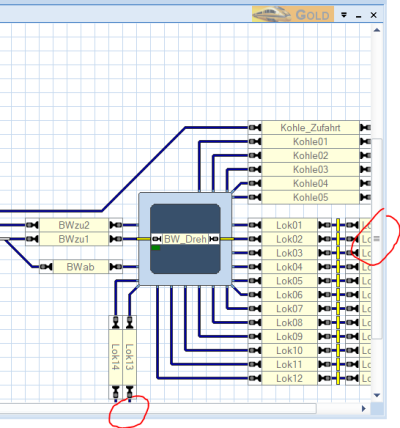
- Fig: Scroll bar

Beim Abschalten des Editiermodus wohlgemerkt; d.h. nach einer Größenänderung des umgebenden Fensters muss evtl. der Editiermodus noch einmal ein- und ausgeschaltet werden, um den Scrollbereich neu zu berechnen.
Weblinks
- Quelle: Forum
- --Wohlmannstetter 16:23, 16. Jun. 2011 (CEST)
- bearbeitet:Digi thomas2003 16:30, 1. Mär. 2014, Uslex 13:49, 8. Jun. 2022 (CEST), Uslex (Diskussion) 12:59, 15. Dez. 2025 (UTC)

