TC Stammtisch im Internet/en: Unterschied zwischen den Versionen
Aus RailRoad&Co.-Wiki
Zur Navigation springenZur Suche springen
Uslex (Diskussion | Beiträge) Die Seite wurde neu angelegt: „The official website is:“ |
Übernehme Bearbeitung einer neuen Version der Quellseite |
||
| (10 dazwischenliegende Versionen von 2 Benutzern werden nicht angezeigt) | |||
| Zeile 1: | Zeile 1: | ||
<languages/> | <languages/> | ||
{{ | {{TC7891011gsb}} | ||
__NOTOC__ | __NOTOC__ | ||
| Zeile 18: | Zeile 18: | ||
The official website is: | The official website is: | ||
* https://discord.com/ | * https://discord.com/ | ||
In order to join the server, you need a Discord account. | |||
The official Discord website offers the option to download the desktop programs for '''Windows, Mac and Linux'''. There are also links to the two app stores for '''Android and iOS'''. | |||
< | <span id="Discord_einrichten"></span> | ||
=== Discord | === Setting up Discord === | ||
The complete instructions for setting up Discord are available for download as a PDF: [[Medium:Tc-discord-server.pdf|Tc-discord-server.pdf]] | |||
== Weblinks == | == Weblinks == | ||
*Source: [https://www.freiwaldsoftware.de/forum/viewtopic.php?p=245971#p245971 forum] | |||
* | * Instructions: [[Medium:Tc-discord-server.pdf|Tc-discord-server.pdf]] | ||
* | |||
* Website: [https://discord.com/ discord.com] | * Website: [https://discord.com/ discord.com] | ||
:-- [[Special:MyLanguage/Benutzer:Uslex|Uslex]] ([[Benutzer Diskussion:Uslex|Diskussion]]) 15:57, 15. Jan. 2024 (UTC) | :-- [[Special:MyLanguage/Benutzer:Uslex|Uslex]] ([[Benutzer Diskussion:Uslex|Diskussion]]) 15:57, 15. Jan. 2024 (UTC) | ||
:bearbeitet: [[Benutzer:Uslex|Uslex]] ([[Benutzer Diskussion:Uslex|Diskussion]]) 08:16, 12. Nov. 2025 (UTC) | |||
[[Kategorie: Hilfe{{#translation:}}]] | [[Kategorie: Hilfe{{#translation:}}]] | ||
Aktuelle Version vom 12. November 2025, 09:16 Uhr
| Verwendung |

|
Railroad&Co Stammtisch on the Internet
Access to the Discord community server
Discord is a communication platform for talking, seeing and writing.
The aim of the TC Stammtisch on the Internet is to provide an informal meeting of TrainController users and those who want to become users. It is intended to be a place for exchanging experiences and imparting knowledge.
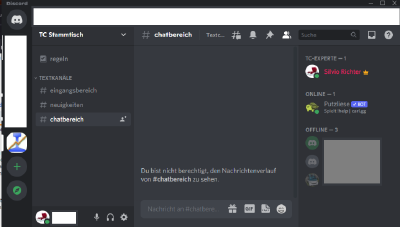
- Fig: Discord TC Stammtisch

Installation of Discord
The official website is:
In order to join the server, you need a Discord account.
The official Discord website offers the option to download the desktop programs for Windows, Mac and Linux. There are also links to the two app stores for Android and iOS.
Setting up Discord
The complete instructions for setting up Discord are available for download as a PDF: Tc-discord-server.pdf
Weblinks
- Source: forum
- Instructions: Tc-discord-server.pdf
- Website: discord.com
- -- Uslex (Diskussion) 15:57, 15. Jan. 2024 (UTC)
- bearbeitet: Uslex (Diskussion) 08:16, 12. Nov. 2025 (UTC)

