Markierungen ihre Farben und Aufgaben/en: Unterschied zwischen den Versionen
Aus RailRoad&Co.-Wiki
Zur Navigation springenZur Suche springen
Uslex (Diskussion | Beiträge) Die Seite wurde neu angelegt: „*More information about the action markers on a separate page in the TC wiki:“ |
Übernehme Bearbeitung einer neuen Version der Quellseite |
||
| (9 dazwischenliegende Versionen von 2 Benutzern werden nicht angezeigt) | |||
| Zeile 1: | Zeile 1: | ||
<languages/> | <languages/> | ||
{{ | {{TC7891011g}} | ||
__NOTOC__ | __NOTOC__ | ||
<span id="Markierungen"></span> | <span id="Markierungen"></span> | ||
== | == Markings == | ||
<span id="Haltemarkierungen,_Bremsmarkierungen,_Geschwindigkeitsmarkierungen"></span> | <span id="Haltemarkierungen,_Bremsmarkierungen,_Geschwindigkeitsmarkierungen"></span> | ||
| Zeile 27: | Zeile 27: | ||
Gray '''action markers''' are used to perform only operations without the effect of red, yellow or green markers described above. | Gray '''action markers''' are used to perform only operations without the effect of red, yellow or green markers described above. | ||
*More information about the action markers on a separate page in the TC wiki: [[Special:MyLanguage/Aktionsmarkierung| | *More information about the action markers on a separate page in the TC wiki: [[Special:MyLanguage/Aktionsmarkierung|Action marker]] | ||
< | <span id="Operationen_ausführen"></span> | ||
=== | === Perform operations === | ||
'''All markers''' can perform operations. | |||
''' | |||
< | <span id="Reihenfolge_der_Ausführung"></span> | ||
=== | === Order of execution === | ||
* If there is '''no green marking''' in a block, the first yellow marking switched on by a passing train acts like a green marking. | |||
* | * If there is '''no yellow marking''' in a block, the first red marking switched on by a passing train acts like a yellow marking. | ||
* | * If there is '''no red marking''' in a block, the first detector (contact detector, signalman or marker) switched on by a passing train acts like a red marking. | ||
* | |||
== Weblinks == | == Weblinks == | ||
*Source: [https://www.freiwaldsoftware.de/forum/viewtopic.php?p=200057#p200057 forum] | |||
* | *TC-wiki: [[Special:MyLanguage/Aktionsmarkierung|Action marker]] | ||
*TC-wiki: [[Special:MyLanguage/Aktionsmarkierung| | *TC-wiki: [[Special:MyLanguage/Begriffe: Block - Melder - Markierung|Terms: Block - Detector - Marking]] | ||
*TC-wiki: [[Special:MyLanguage/Begriffe: Block - Melder - Markierung| | *TC-wiki: [[Special:MyLanguage/Markierungen löschen|Delete markings]] | ||
*TC-wiki: [[Special:MyLanguage/Markierungen löschen| | |||
:-- Wohlmannstetter 09:03, 25. Sep. 2018 | :-- Wohlmannstetter 09:03, 25. Sep. 2018 | ||
Aktuelle Version vom 8. Dezember 2025, 10:13 Uhr
| Verwendung |

|
Markings
Stop markings, brake markings, speed markings
Since there was discussion and some confusion about the meaning of the colors of markings, Mr. Freiwald summarized the most important information below:
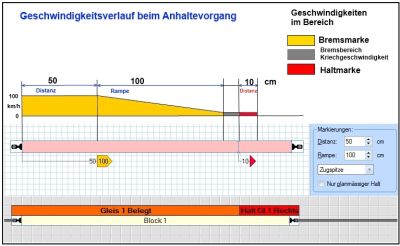
- Fig: Stopping process

- Red stop markings indicate the places in a block where trains stop - when they have to stop in that block.
- Yellow brake markings indicate the places in a block where trains that have to stop in that block start to brake.
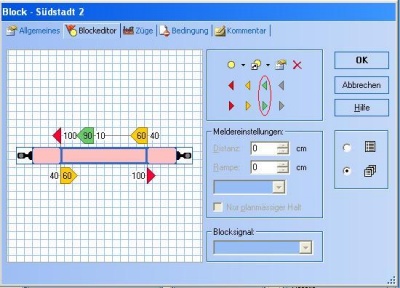
- Fig: Speed marking green

- Green speed markings indicate the locations in a block where trains begin to reduce their speed to the speed applicable in the following sections of track (blocks or routes) - provided that a lower speed applies in the following sections of track.
Action markers
Gray action markers are used to perform only operations without the effect of red, yellow or green markers described above.
- More information about the action markers on a separate page in the TC wiki: Action marker
Perform operations
All markers can perform operations.
Order of execution
- If there is no green marking in a block, the first yellow marking switched on by a passing train acts like a green marking.
- If there is no yellow marking in a block, the first red marking switched on by a passing train acts like a yellow marking.
- If there is no red marking in a block, the first detector (contact detector, signalman or marker) switched on by a passing train acts like a red marking.
Weblinks
- Source: forum
- TC-wiki: Action marker
- TC-wiki: Terms: Block - Detector - Marking
- TC-wiki: Delete markings
- -- Wohlmannstetter 09:03, 25. Sep. 2018
- bearbeitet: Uslex (Diskussion) 10:15, 20. Jul. 2022 (CEST), Uslex (Diskussion) 08:52, 1. Mär. 2024 (UTC), Francis1954 14:15, 12. Jan. 2025 (UTC)

