Zugfahrt erstellen per Drag-and-Drop/en: Unterschied zwischen den Versionen
Uslex (Diskussion | Beiträge) Die Seite wurde neu angelegt: „In the meantime, these two methods have been placed on separate menu commands without changing the overall functionality.“ |
Uslex (Diskussion | Beiträge) Die Seite wurde neu angelegt: „Just like the classic '''creation of a train journey''', the creation of a train journey via drag & drop is only possible in edit mode.“ |
||
| Zeile 40: | Zeile 40: | ||
In the meantime, these two methods have been placed on separate menu commands without changing the overall functionality. | In the meantime, these two methods have been placed on separate menu commands without changing the overall functionality. | ||
Just like the classic '''creation of a train journey''', the creation of a train journey via drag & drop is only possible in edit mode. | |||
<div lang="de" dir="ltr" class="mw-content-ltr"> | <div lang="de" dir="ltr" class="mw-content-ltr"> | ||
Version vom 12. Januar 2025, 19:57 Uhr
| Verwendung |

|
Create train journey with AutoTrain via drag-and-drop
Drag-and-Drop
"Drag and drop" means that objects can be moved and relocated very easily in the program.
For example, locomotives or entire trains can be simply clicked on without releasing the mouse button. As long as the train is held with the mouse, it can be moved to another place on the model railway layout. As soon as the mouse is released, the train stays where the mouse is currently located.
You can find different spellings on the internet:
- Drag-and-Drop (that's what it says in the dictionary)
- Drag & Drop
- Drag'n'Drop
All these spellings mean the same thing: drag-and-drop
AutoTrain via drag&drop outside of edit mode
Mr. Freiwald gives some general tips in the forum:
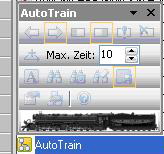
- Fig: Autotrain train ride

When it was introduced, AutoTrain via drag & drop outside of edit mode only served to make a train run by dragging it with the mouse, without having to create a train route first.
- This is of course only possible if the train in question is also in a block.
This philosophy has not changed for many years.
AutoTrain via drag & drop in editing mode
A new addition in newer versions is the additional option of creating permanent train journeys with AutoTrain via drag & drop in edit mode.
In the meantime, these two methods have been placed on separate menu commands without changing the overall functionality.
Just like the classic creation of a train journey, the creation of a train journey via drag & drop is only possible in edit mode.
Zugfahrten nicht laufenden Betrieb erstellen
AutoTrain per Drag & Drop ist nicht dafür vorgesehen, während des laufenden Betriebs - also außerhalb des Editiermodus - dauerhafte Zugfahrten zu erstellen. Und es war auch noch nie dafür vorgesehen.
Erstellen von Zugfahrten mittels AutoTrain Symbolleiste
Die obigen Erläuterungen für AutoTrain per Drag&Drop gelten genauso auch für die AutoTrain-Symbolleiste.
Zwei Gruppen von Befehlen für AutoTrain
Mit den Befehlen der ersten Gruppe (gelb) kann AutoTrain im Editiermodus aufgerufen werden. Hiermit können neue Zugfahrten mit Hilfe von AutoTrain erstellt werden.
Mit den Befehlen der zweiten Gruppe (grün) wird AutoTrain im Betriebsmodus (außerhalb des Editiermodus) aufgerufen. Hiermit können Züge gefahren werden, ohne zuvor im Editiermodus eine Zugfahrt erstellen zu müssen.
Weblinks
- Quelle:
- TC-wiki: AutoTrain per Drag-and-Drop
- -- Uslex (Diskussion) 18:35, 12. Jan. 2025 (CET)

