Markings; their colors and their functions
Aus RailRoad&Co.-Wiki
| Verwendung |

|
Marking
Stop markings, brake markings, speed markings
Since there was discussion and some confusion about the meaning of the colors of markings, Mr. Freiwald summarized the most important information below:
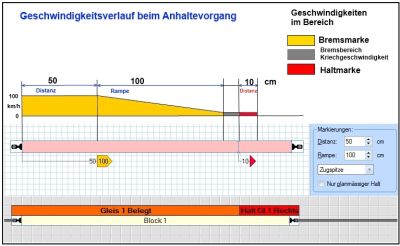
- Fig: Stopping process

- Red stop markings indicate the places in a block where trains stop - when they have to stop in that block.
- Yellow brake markings indicate the places in a block where trains that have to stop in that block start to brake.
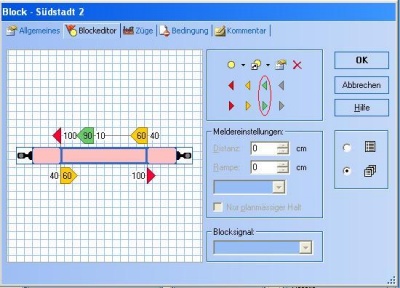
- Fig: Speed marking green

- Green speed markings indicate the locations in a block where trains begin to reduce their speed to the speed applicable in the following sections of track (blocks or routes) - provided that a lower speed applies in the following sections of track.
Action markers
Gray action markers are used to perform only operations without the effect of red, yellow or green markers described above.
- More information about the action markers on a separate page in the TC wiki: Action marker
Perform operations
Alle Markierungen können Operationen ausführen.
Reihenfolge der Ausführung
- Gibt es in einem Block keine grüne Markierung, so wirkt die erste von einem vorbeifahrenden Zug eingeschaltete gelbe Markierung wie eine grüne Markierung.
- Gibt es in einem Block keine gelbe Markierung, so wirkt die erste von einem vorbeifahrenden Zug eingeschaltete rote Markierung wie eine gelbe Markierung.
- Gibt es in einem Block keine rote Markierung, so wirkt der erste von einem vorbeifahrenden Zug eingeschaltete Melder (Kontaktmelder, Bahnwärter oder Markierung) wie eine rote Markierung.
Weblinks
- Quelle: Forum
- TC-wiki: Aktionsmarkierung
- TC-wiki: Begriffe: Block - Melder - Markierung
- TC-wiki: Markierungen löschen
- -- Wohlmannstetter 09:03, 25. Sep. 2018
- bearbeitet: Uslex (Diskussion) 10:15, 20. Jul. 2022 (CEST), Uslex (Diskussion) 08:52, 1. Mär. 2024 (UTC), Francis1954 14:15, 12. Jan. 2025 (UTC)

