Set up control car
| Verwendung |

|
Control car
Question
How do I set up a control car for TrainController?
Control car as locomotive
The setting "locomotive" is also correct for a control car. From the perspective of the control logic, a control car is an intermediate device between a locomotive and a carriage, but with much more similarity to a locomotive than to a carriage.
- A control car can "pull" a train, i.e., run at the front of a train, without the train becoming a "pushed" train in terms of control logic.
- A control car responds to directional commands like a locomotive.
- A control car has a driver's cab like a locomotive.
The only difference is that a control car has no drive mechanism. Therefore, it has more similarities than differences to a locomotive than to a carriage.
Even in its prototype, a control car is a "stripped-down substitute locomotive". Its control logic would remain practically unchanged if one were to eliminate the only difference to a locomotive and install a drive system.
However, if one were to eliminate the difference to a car and remove the driver's cab, much more serious operational differences would result, even in the prototype.
A control car is essentially a locomotive with 0 kW of drive power.
Control car in TrainController from version 11 onwards
TraniController Version 11 users may have noticed that control cars are now a subgroup of cars and can be used separately in descriptions.
If the control car is registered as a locomotive, the "wrong-way driving bit" must be set in CV 29 (read CV29 value +1). This makes the control car react in exactly the opposite way to the locomotive at the front of the train.
However, the checkbox in the function library only applies to operation in the driver's cab, not to operations in automatic mode.
Carriages also have two sides, A and B. In control cars, the driver's cab is installed on side A (i.e., at the front). If a train consists of a control car and the driver's cab is at the rear, then the car, viewed from the outside, will move backward when the train is pulled.
Control car in TrainController from version 8 onwards
In the properties of a car, it can be designated as a control car: simply activate the corresponding Control Car checkbox!
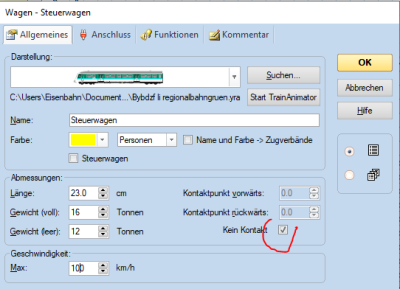
- Fig.: Control car contact

It is essential to check whether this car triggers a contact – if so, the No Contact option must be deactivated. Otherwise, a pushed train will stop inaccurately!
Control cars differ from regular cars in the following ways:
- They can also send direction commands to an assigned decoder. This makes it possible to control direction-dependent functions (e.g., headlights or taillights) on a car.
- When included in a train consist, they can be selected from the driver's cab, just like locomotives, to control the speed and direction of the entire train consist.
Control car in TrainController up to version 7
Silvo Richter provided the following contribution. The reason was this post:
Control cars with their own decoder must be set up as locomotives in TC Gold.
- They are much more like a locomotive than a passenger car, with the difference that they have no motor and therefore no power.
- A power output of 1 kW must be entered.
Why not use it as a carriage?
- While decoder functions can be assigned to carriages, no change of direction is generated, and this prevents the red-white light change.
- If the train consist is configured with a locomotive-carriage-locomotive combination, the train operating rules only start in reverse/forward are also bypassed, which is intentional.
- Finally, a push-pull train can also be pushed.
Function forwarding
There are other posts on this topic:
- This post deals with the topic of "function forwarding" - headlights and taillights on the control car.
- See also here in the TC Wiki under Funktionsweiterleitung
Weblinks
- Source: topic
- Control car as locomotive: Forum
- Control car in TC 11: Forum
- TC-wiki: Funktionsweiterleitung
- TC-wiki: Cab lighting in the control car
- --Digi thomas2003 13:23, 1. Mär. 2014 (CET)
- bearbeitet: Uslex 09:40, 4. Jun. 2022 (CEST), Uslex (Diskussion) 12:49, 15. Dez. 2025 (UTC)

